Introduction
In 2026, a phenomenon in AI emerged known as “raising lobsters”—not the seafood, but the open-source AI framework OpenClaw, affectionately called “lobster” by local users due to its red lobster logo. AI content creators use OpenClaw to command advanced cloud AI models for bulk generation of images and videos or to fine-tune local AI models for personalized AIGC works. A powerful gaming laptop with efficient cooling is essential as a creative tool. The HyperX Shadow Elf PRO 16 gaming laptop features the Intel Ultra 9 290HX Plus chip and NVIDIA GeForce RTX 5070 graphics card, making it a standout performer in the AIGC content creation field.
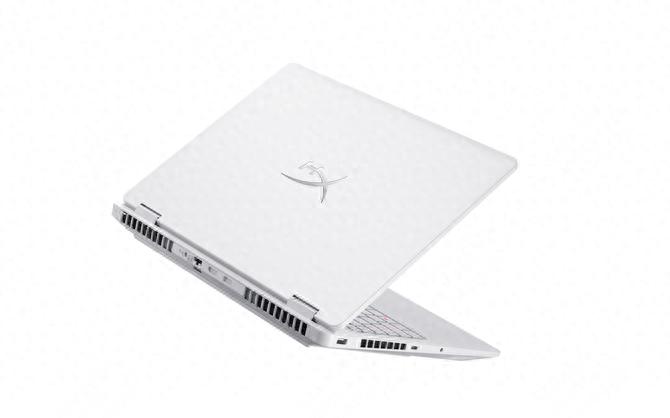
Design and Build
The design of the HyperX Shadow Elf PRO 16 emphasizes “performance visibility”. It comes in black and white options, with a solid metal panel on the front, prominently displaying the HyperX logo, making its gaming attributes immediately recognizable. This gaming identity also signifies robust overall performance, including AI capabilities. HyperX and Shadow Elf are set to empower the gaming laptop ecosystem, and it’s only natural that the HyperX Shadow Elf PRO 16 meets AI creative demands.
Hardware Specifications
The hardware configuration of the HyperX Shadow Elf PRO 16 is considered a “perfect AI partner”. It features the Intel Core Ultra 9 290HX Plus chip with a revolutionary 24-core, 24-thread design, achieving a maximum boost frequency of 5.5GHz, showcasing impressive power in multitasking and complex scene rendering. Paired with the NVIDIA GeForce RTX 5070 graphics card, it can quickly generate high-definition images using local image models without the limitations of cloud models. Traditional workflows, such as using Photoshop’s “AI filter” or “3D rendering” features to assist in creating creative images, can also benefit from the RTX 5070’s CUDA ecosystem for accelerated processing.

The 16-inch 2.5K QHD resolution (2560×1600) IPS display boasts a 240Hz refresh rate, 16:10 aspect ratio, 500 nits brightness, and 100% sRGB color gamut coverage. The recently popular Chat image generation can seamlessly integrate with this high-quality screen in your AI design workflow, making it easier to fine-tune color details. With TÜV Eyesafe low blue light certification, prolonged use of AI tools for creation or video editing is less likely to cause eye fatigue. It comes standard with 16GB DDR5 5600MHz high-frequency memory, allowing for an upgrade to a second memory stick based on software requirements. The pre-installed PCIe 4.0 SSD can be upgraded to a PCIe 5.0 SSD, providing complete hardware support for AIGC content creation.
Cooling System
The cooling system of the HyperX Shadow Elf PRO 16 is a reassuring feature for AI users. The Cool Storm PRO+ cooling module is a significant investment, featuring a design with 6 heat pipes, dual fans, and six airflow channels. The oversized heat pipe combination (10mm×2/6mm×3/2mm×1) covers both the CPU and GPU, paired with a 2.6mm ultra-thin heat spreader and 8.5W/m·K phase change thermal paste, greatly enhancing heat dissipation efficiency. The fan’s reverse dust removal technology automatically clears dust buildup, keeping the cooling channels unobstructed over time.
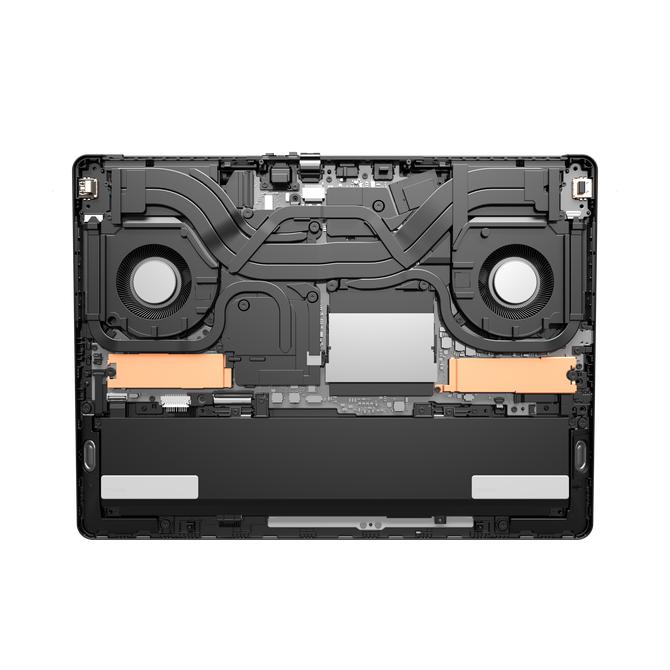
Running local AI model inference often requires prolonged high loads. According to official test data, under full load conditions at 25°C ambient temperature, the dual-load test results showed: CPU 90W at 84°C + GPU 115W at 80°C = 200W+ full power release; in turbo mode, the noise level remains around 46 decibels, with the WASD area temperature controlled below 36°C. You can run AI model inference or video rendering for hours without discomfort from heat.
Connectivity
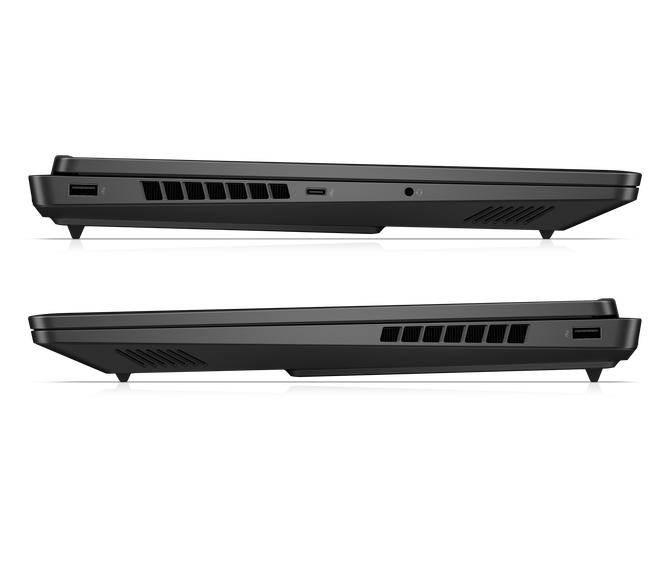
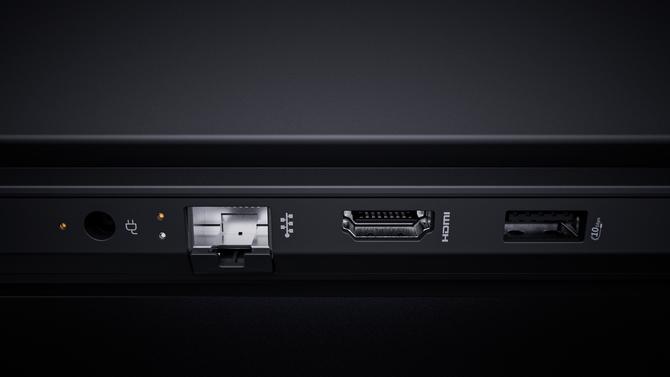
In a creative workflow, material archiving and delivery are also crucial. This laptop features a rich array of ports: on the left side: USB-A 3.2 (5Gbps), USB-C (10Gbps, DP1.4, and 100W PD charging), and a headphone/microphone combo jack. On the right side: USB-A 3.2 (5Gbps). At the back: DC power input, RJ45 gigabit network port, HDMI 2.1, and USB-A 3.2 (10Gbps). These high-speed ports, combined with a mobile SSD, allow for quick transfers of AIGC results. If your studio is well-equipped and has a dedicated intranet environment, you can use the HyperX Shadow Elf PRO 16’s RJ45 gigabit wired network or WiFi 7 wireless card for connectivity, easily transferring AIGC content to the local material server for better asset management.
Gaming Performance
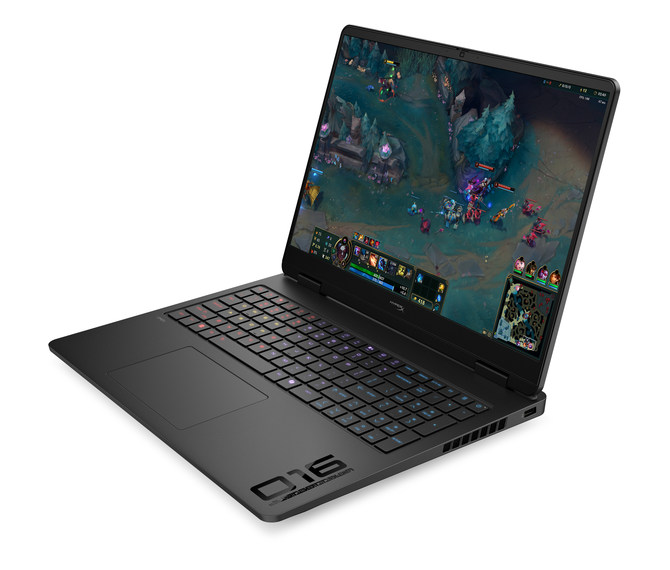
In addition to regular content creation, you can also enjoy gaming during breaks. With both the CPU and GPU being versatile performers, the gaming experience is as excellent as the previously mentioned AI creation capabilities. The HyperX Shadow Elf PRO 16 features an 8KHz responsive keyboard, which is 32 times faster than traditional laptop keyboards with a 4ms response time, achieving an ultra-low response delay of 0.125ms. This means your in-game actions are more responsive, allowing for impressive gameplay.
Software Ecosystem
The software ecosystem is also noteworthy; Hui Xiaowei serves as a daily assistant and is a local large model. It is part of the same ecosystem as AI creation, enhancing the AI atmosphere. The OMEN Gaming Hub’s OMEN AI is a helpful tool for optimizing game frame rates after your creative work is complete. With OMEN AI, you no longer need to painstakingly search for game optimization tutorials before playing.

Conclusion
From AI-friendly hardware configurations to cooling systems, extensive expansion capabilities to software ecosystems, the HyperX Shadow Elf PRO 16 demonstrates comprehensive hardcore strength. Whether you need to quickly generate images, videos, or enjoy gaming in your downtime, this “jack-of-all-trades” laptop delivers balanced, outstanding performance, making it a reliable partner on the gaming battlefield. If you are looking for a machine that can handle high-load AIGC generation without compromising on gaming experience, the HyperX Shadow Elf PRO 16 is definitely worth your attention.
Comments
Discussion is powered by Giscus (GitHub Discussions). Add
repo,repoID,category, andcategoryIDunder[params.comments.giscus]inhugo.tomlusing the values from the Giscus setup tool.